VPN Proxy Master - Safer Vpn
- 4.7
- Rating
- 100.00M
- Installs
- Free
- Price

 Analysis by App-foxy
I spent time using VPN Proxy Master - Safer Vpn as a practical Android privacy tool rather than treating it as a one-tap solution to every internet problem. It sits in the tools category, comes from SECUREGUARD GROUP, and is free to install, with optional in-app purchases ranging from $0.99 to $79.99 per item. My first impression was straightforward: it is designed for people who want a simpler way to route browsing through a VPN without learning the technical side of network configuration.
That simplicity is the main reason it has attracted such a large audience. It has passed 100 million installs, carries a 4.7 average from around 1.4 million ratings, and has roughly 44 thousand written reviews. Those figures suggest that the app is approachable, but they do not remove the need to use it thoughtfully. A VPN can change how your connection reaches the internet, yet it cannot make every website safe, stop every form of tracking, or guarantee that all online activity becomes anonymous.
How I use it for an ordinary browsing session
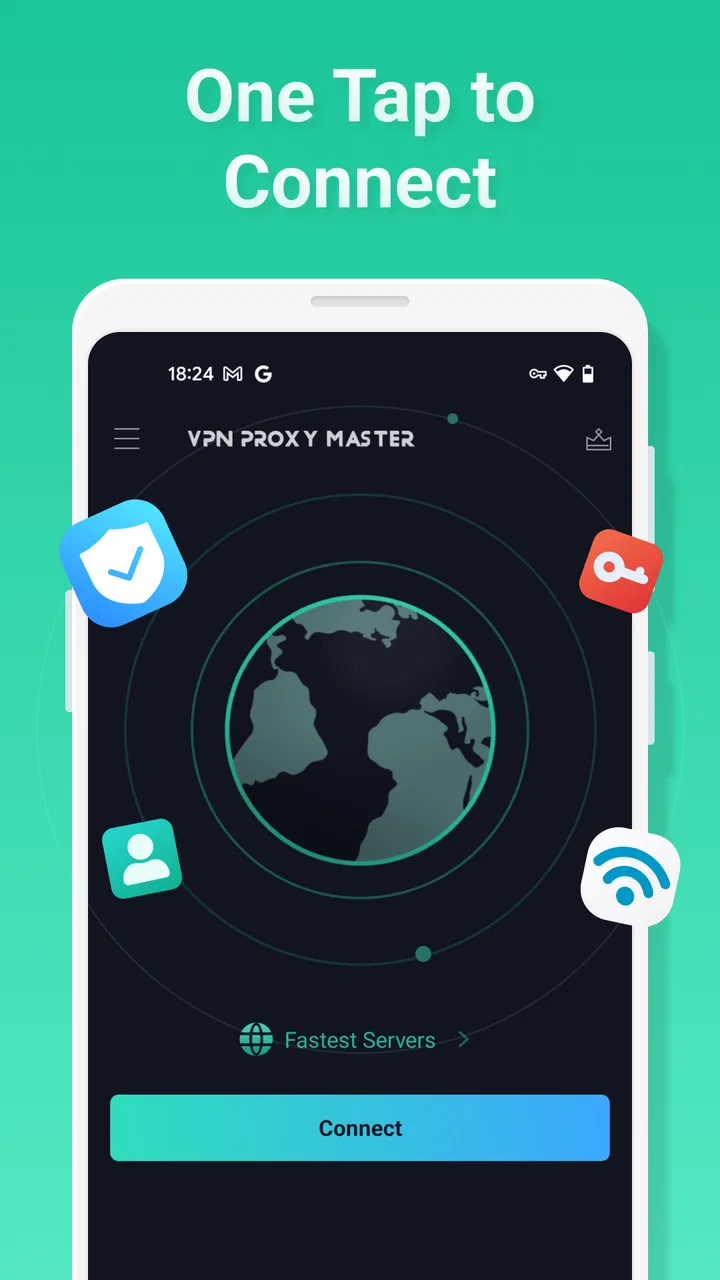
My baseline workflow is deliberately boring. I open the app before using an unfamiliar public network, choose the connection option, and check whether the VPN indicator appears on the device before opening a browser or another app. This habit matters more than repeatedly switching servers without a reason. If I connect only after loading a page, the first part of that session may already have used the ordinary connection.
You May Also Like

 Blood Strike: 2.5 Anniversary
Blood Strike’s Loadouts Turn Every Drop Into a Tactical Gamble
A close look at Blood Strike’s custom loadouts: how fast access to signature weapons reshapes its battle royale rhythm, rewards preparation, and narrows the gap between fights.

 Pandora - Music & Podcasts
Pandora’s Music Is Easy to Start, but Harder to Recover
Pandora’s strength is its low-effort path from a seed to a station. Its weak spot is how much confidence it asks you to place in connection, setup, and quiet recovery.

 8 Ball Pool
 Is Built on Rivalries, Rematches, and Routine
A close look at the rivalries, rematches, shared routines, and unanswered safety questions that turn a quick pool match into a persistent mobile community.

 Samsung Music
’s Quiet Strength Is Playing What You Already Own
Its reach comes less from spectacle than from dependable access to a personal library. That simplicity is both the app’s strongest retention engine and its ceiling.

 AccuWeather: Weather Radar
AccuWeather Review: A Quick, Clear Forecast for Everyday Decisions
For everyday plans, the best forecast is the one you can understand quickly. AccuWeather makes rain timing, radar, and local conditions easy to act on, with a few trade-offs.

 Hill Climb Racing
Why Hill Climb Racing Still Turns Crashes Into One More Run
A tiny car, a bumpy hill and one more upgrade: Hill Climb Racing keeps resurfacing because its simple chaos makes every near-miss feel personal.
More From Our News Desk
View All News


For everyday browsing, the appeal is that I do not need to configure a separate VPN profile manually. The app is aimed at quick access to a private network, so it makes sense for a café visit, a hotel connection, an airport wait, or a shared office network. I would still avoid entering sensitive information on a device I do not control, even with the VPN active. The tunnel protects the connection path, not the security of a fake login page or a compromised phone.
One useful routine is to connect before opening several related apps, not just the browser. For example, if I am checking travel information, reading messages, and comparing prices on a public hotspot, I start the VPN first and leave it active while moving between those tasks. That avoids the common mistake of protecting one browser tab while other traffic continues outside the tunnel.
When I finish, I disconnect if I am back on a trusted home network and do not need the extra routing layer. This is not because the app is unusable at home; it is because a VPN may introduce extra connection steps, affect local-device access, or make troubleshooting less obvious. Knowing when not to use it is part of getting value from it.
The everyday situation where it helps most
Imagine I am working from a hotel room and the Wi-Fi requires a sign-in page. I first join the network, complete the hotel’s access step, and then activate the VPN. If I try to start the VPN before the network allows normal access, the connection may not complete. Once connected, I can browse through the tunnel instead of relying solely on the hotel network’s protection.
That sequence is a small but important practical detail. A VPN cannot replace the initial Wi-Fi login process. If the connection seems stuck, I check whether the network itself is asking for a browser confirmation, then reconnect the VPN afterward. This workflow is more reliable than assuming the VPN can bypass every captive portal automatically.
I also keep expectations realistic when using mobile data. The app may be useful there for privacy or for reaching the internet through a different network route, but a VPN does not create additional mobile bandwidth. If the mobile signal is weak, the tunnel cannot turn it into a fast connection. In fact, the extra routing can make a marginal connection feel less responsive.
Settings I would check before relying on it
The first setting I look for in any VPN app is the connection behavior: whether it starts only when I press the button, whether it can reconnect, and whether the system shows an active VPN indicator. The exact choices available can depend on the device and app build, so I avoid assuming that a setting behaves identically on every phone. The current version is 2.7.3, and users should pay attention to what their own screen actually offers rather than following instructions made for an older release.
I also inspect the server or location selection instead of accepting the first option every time. A nearby location is usually the sensible starting point when my goal is responsive browsing. A distant route can be useful for a particular access need, but it may increase delay. I do not judge a location by its name alone; I test the pages or services I actually need and switch back if the experience becomes sluggish.
Another setting worth checking is whether the app presents a premium choice during normal use. Since the app is free but includes optional purchases, I read the screen carefully before confirming anything. I prefer to understand whether a button starts a connection, opens an upgrade offer, or changes the available location options. That simple pause prevents accidental purchases and makes the free experience easier to evaluate honestly.
On Android, I pay attention to the system-level VPN confirmation and the persistent status notification. These are useful signs that the connection is active, but I do not treat the notification as proof that every application is behaving exactly as expected. Some apps may refuse VPN connections, use their own network methods, or simply fail for reasons unrelated to the tunnel. If one service stops working, I test another site before concluding that the entire app is broken.
Battery and data use are also part of the settings decision. I do not leave a VPN running all day by habit if I am only checking a few pages. Keeping it active during a long session can be reasonable, but disconnecting afterward reduces one more background network task. The best choice depends on whether privacy during that session is more important than convenience and battery efficiency.
Faster patterns that save time
Experienced use is less about pressing the connect button faster and more about removing repeated decisions. I use a simple rule: nearby location for normal browsing, a different location only when I have a clear reason, and no VPN when I am diagnosing whether my ordinary connection is the problem. This prevents me from blaming the app for an issue caused by the Wi-Fi network, the website, or the phone itself.
If a page loads slowly, I do not immediately cycle through every available option. I first disconnect and test the same page normally, then reconnect and compare. If the ordinary connection works and the VPN connection does not, changing to a closer location may help. If neither works, the likely problem is elsewhere. This two-step check is more useful than random switching because it tells me whether the VPN is involved at all.
I use the same approach with video, downloads, and calls. A tunnel can be helpful for privacy, but speed-sensitive activities expose its trade-off quickly. If a video service buffers only while the VPN is active, I try another location or temporarily disconnect when privacy is not the priority. For a work call on a trusted network, stability may matter more than routing the session through a VPN.
Shortcuts are most valuable when they support a repeatable habit. I keep the app easy to reach, connect before starting a public-network session, and disconnect when the session ends. I do not repeatedly open the app just to confirm what the system indicator already shows. This makes the tool less intrusive and reduces the temptation to change settings without understanding the result.
There is also a useful separation between privacy tasks and location tasks. If I want a safer connection on public Wi-Fi, I choose the route that gives a stable browsing experience. If I need a particular regional endpoint, I accept that the best location for that purpose may not be the fastest one. Mixing those goals can lead to disappointment because the most convenient route and the most relevant route are not always the same.
Where the app reaches its limits
The biggest limitation is that a VPN is not a complete privacy system. It can help shield traffic from the local network, but it does not stop websites from identifying me through an account, cookies, browser settings, or device signals. I still use strong passwords, avoid suspicious links, and keep the phone updated. Anyone expecting the app to replace those habits will overestimate what it can do.
I would also avoid describing it as a guarantee of anonymity. The VPN provider becomes part of the connection path, and trust still matters. A privacy tool changes whom I ask to carry my traffic; it does not make the traffic ownerless. For highly sensitive work, I would want to examine the provider’s privacy documentation and choose a service whose policies and technical controls match that risk.
Speed is another unavoidable trade-off. Routing traffic through an additional server can add delay, and the effect is more noticeable with gaming, live calls, large downloads, or distant locations. This app may be convenient for browsing, but I would not choose it solely because I expect a faster connection in every situation. The phrase “faster internet tunnel” may describe the intended experience, yet real performance depends on the network, route, location, time, and service being accessed.
Compatibility can require patience too. Some banking, streaming, shopping, and workplace services may challenge or block VPN traffic. That is not necessarily a defect unique to this app; services often treat shared VPN addresses differently from ordinary residential connections. If a trusted service asks for extra verification, I first disconnect and retry through the normal connection rather than repeatedly changing locations.
The free model is convenient for trying the basic workflow, but users should decide whether optional purchases are worthwhile based on their actual needs. I would not pay simply because a premium prompt appears. I would consider it only after testing how often I use the app, whether the free choices fit my routine, and whether the purchase terms are clear. The listed purchase range is wide enough that checking the exact item and billing conditions is essential before confirming.
Who should use it, and who should skip it
I think this app suits someone who wants a low-friction VPN for public Wi-Fi and ordinary browsing. It is also a reasonable starting point for a user who has never configured a VPN manually and wants a more approachable interface. The Everyone age rating makes it broadly accessible, although younger users still need guidance about phishing, oversharing, and unsafe websites because the VPN does not solve those problems.
It can be useful for travelers who regularly move between unfamiliar networks, provided they understand the hotel-login sequence and are willing to disconnect when troubleshooting. It may also help someone who wants a quick privacy layer while researching a sensitive topic on a shared connection. In both cases, the benefit comes from a consistent habit rather than leaving the app installed and assuming it protects everything automatically.
I would skip it if my main requirement is the lowest possible latency for competitive gaming or live communication. I would also look elsewhere if I need detailed enterprise controls, carefully documented traffic policies, advanced routing rules, or a workflow built around specialized professional security requirements. A simple mobile VPN is not automatically the best tool for a business network or a high-risk investigation.
Compared with manually configured VPN profiles, the advantage here is convenience. I do not need to collect server details or manage a configuration file for a basic session. Compared with browser-only privacy tools, it is broader because the connection can cover activity beyond one browser, but that broader scope also means I need to watch for app compatibility and battery impact. Compared with a normal connection, it adds a privacy layer on untrusted networks while potentially adding delay. Those are the trade-offs I would use to make the decision.
My final assessment after using it as a routine tool
The best way to use VPN Proxy Master is as a deliberate switch, not a magic shield. I connect before a public-network session, choose a sensible location, check that the device reports an active VPN, and test the services that matter. When speed or compatibility becomes more important than the extra routing, I disconnect without treating that as failure.
The app’s free entry point, broad device compatibility from Android 6.0 onward, and straightforward purpose make it approachable. Its large install base and strong average rating also explain why many people find it easy to adopt, but my recommendation is still conditional: use it for the situations it handles well, and keep separate security habits for everything it cannot cover.
SECUREGUARD GROUP has made a tool that is easy to fit into a daily routine, especially for browsing on networks I do not fully trust. I would recommend it to a friend who wants a simple starting point and understands the limits of VPN protection. I would not recommend relying on it alone for anonymity, maximum speed, or specialized security work. Used with that distinction in mind, it is a practical utility rather than an overpromised cure for every online risk.
FAQs for VPN Proxy Master - Safer Vpn
01What is VPN Proxy Master and how does it work?
VPN Proxy Master is an application designed to provide secure and private internet access by encrypting your connection and masking your IP address. This makes it difficult for hackers or unwanted parties to track your online activities. It works by connecting your device to a remote server, thereby securing your internet traffic.
02Is VPN Proxy Master free to use, or are there any in-app purchases?
VPN Proxy Master offers a free version with basic features. However, it also provides a premium subscription option which unlocks additional features such as faster connection speeds, access to more server locations, and an ad-free experience. Users can decide based on their needs and budget.
03How secure is VPN Proxy Master in protecting my personal data?
VPN Proxy Master employs high-level encryption protocols to secure user data, ensuring that your internet activity remains private and safe from cyber threats. It also includes features like a kill switch, which disconnects your internet when the VPN connection drops, further protecting your data.
04Can I use VPN Proxy Master on multiple devices simultaneously?
Yes, VPN Proxy Master allows you to use the service on multiple devices at once. This feature is especially useful for users with multiple gadgets, ensuring all your devices are protected under a single subscription. However, the number of devices may vary depending on the subscription plan.
05Does VPN Proxy Master affect internet speed?
Using a VPN can sometimes slow down your internet speed due to the encryption process and rerouting of traffic through remote servers. However, VPN Proxy Master is optimized to minimize speed loss, and its premium version offers better performance with faster servers for an enhanced browsing experience.
Pros
- Easy to set up and use interface.
- Offers a wide range of server locations.
- Supports multiple devices simultaneously.
- No-log policy ensures privacy.
- Fast connection speeds.
Cons
- Free version has limited features.
- Occasional connection drops.
- Some servers may be slow.
- Ads in free version can be intrusive.
- Limited customer support options.

VPN Proxy Master - Safer Vpn
Gallery